

Source walkthrough
From a repository to a tree you can see. The walkthrough uses a greenfield scratch project called Acme, with an existing-code path below; ids and commit hashes are illustrative.
This page documents version 0.21.4, schema 12, orientation generation 58, and eleven embedded skills. The shorter Quickstart installs the v0.21.4 release instead of building from source.
Build the matching source
Section titled “Build the matching source”From a trusted checkout of this repository, with Go available:
go build -o /tmp/tiller-source ./cmd/tiller/tmp/tiller-source --versionmkdir -p /tmp/tiller-source-bincp /tmp/tiller-source /tmp/tiller-source-bin/tillerexport PATH="/tmp/tiller-source-bin:$PATH"Verify the version is 0.21.4 before using the commands below. Use a disposable project; do not upgrade an existing team’s checkout merely to try the walkthrough.
Turn a repository into a tiller project
Section titled “Turn a repository into a tiller project”In any git repository (a fresh one is fine):
tiller init --name "Acme Platform" --key acme --kind greenfieldInitialized "Acme Platform" (acme, greenfield).
**Next** 1. Put your design inputs under .tiller/design/. For in-repo docs, choose a move into .tiller/design/ when Tiller takes ownership, or a pointer page there when another consumer needs the original location. Record committed source provenance with `tiller link design --from` before retiring translated sources. External --design imports are copies; keep their source documents. --design imports only on the init that scaffolds. 2. Register yourself as a contributor (a human, once per project): tiller add contributor <id> --name "<full name>" 3. Join, wiring your identity and your agent: tiller join --as <id> 4. tiller check readiness 5. tiller guide decompose 6. From there the feature frontier paces the work, one feature specified when its turn comes. This lists your ranked next moves and the skill that fits: tiller guide
The build and tests gates wire later in .tiller/tiller.yml, once a stackexists; the evals gate is already active.--kind describes the relationship to code that predates Tiller adoption: greenfield for a new system, brownfield for this repository’s existing system, or legacy-migration for a new system replacing an old reference system. It does not restrict later feature change types. A greenfield project’s own shipped code can later be modified, replaced, or migrated without changing kind. init scaffolds .tiller/ and writes .tiller/orientation.md, the generated page an agent reads first.
Then put a design input in place, as the first Next step says. For this walkthrough one short page is enough:
mkdir -p .tiller/designprintf '# Acme\n\nA small application with a health route.\n' > .tiller/design/overview.mdBringing existing code
Section titled “Bringing existing code”Choose --kind brownfield to adopt the system in this repository, or --kind legacy-migration
to build a replacement for an old system. Both start with an explicit writable code root:
inputs: code: - { root: ., mode: surface }When this repository has an observable HEAD, first scaffold also records project.adopted with
its git:<short-sha> and a UTC observation time. This is not a dirty-worktree fingerprint or the
HEAD of an external legacy repository. Non-Git and unborn repositories initialize without the
anchor. Reruns preserve the original manifest, including any absent anchor.
For legacy-migration, add the old system’s existing path to the human-owned .tiller/tiller.yml
before readiness. This is required even when you imported docs with --design. For example,
if the old system lives in the sibling directory ../acme-legacy, keep the surface declaration
and add:
- { root: ../acme-legacy, mode: reference }Every declared root needs an explicit surface or reference mode. An empty or misspelled mode
fails readiness and surface recording, including on older greenfield manifests. Correct the
manifest rather than expecting migrate to rewrite it. A reference root is read-only input:
recorded surfaces cannot equal it, sit beneath it, or contain it, including through an alias.
Choose specific writable paths instead of a parent directory that includes legacy code.
After registering a contributor and joining, run tiller guide derive-baseline for either existing-code
kind. It reads existing docs first, then brownfield surface code or legacy reference code. Derive
undocumented code or translate docs at module grain, reconciling current code rather than assuming
an import is accurate. Use adoption history when available, but say when it is missing.
Ask once whether in-repo doc ownership moves into .tiller/design/ or another consumer needs a
pointer page. Do not leave two live copies silently. An external --design <dir> import remains
different: first scaffold copies its source without changing or deleting it. A valid rerun succeeds
but skips the import; add later inputs directly. Commit exact uncommitted source inputs, including
local imported copies, before translation so --from can record recoverable project-HEAD blobs.
Record that provenance before retiring agreed in-repo sources; never retire external originals.
Fresh imports refuse a root-level baseline.yml entry, including case variants, before scaffold
writes. Use a prose-only source directory; importing another project’s confirmations is not supported.
tiller guide derive-baseline# Draft .tiller/design/as-is/editor.md after reading its docs and code.tiller link design as-is/editor.md --describes app/editortiller link design as-is/editor.md --from docs/editor-spec.md# Retire only the agreed in-repo source after recording provenance.# Commit exact reviewed docs, ledger, question, and event paths on the integration branch.tiller readout derive-baseline# Human review, then confirmation of named docs:tiller approve design as-is/editor.mdtiller check readinesstiller guideThe readout lists every recorded source path plus blob mapping and every ledger doc, described
path, and confirmation fact. Review translations against those recoverable blobs and current code.
Run notes separately name dropped, merged, or unplaceable material and actual questions opened.
Ledger counts do not prove all source meaning survived; Open questions is the current count.
The completed baseline readout stops at one HUMAN review action. Pending docs on re-entry need
inspection or review, not duplicate derivation. The agent never decides confirmation.
approve design leaves Markdown alone. It atomically confirms all named docs against working-tree
code and one project HEAD; it does not use project.adopted, an external HEAD, or assert a clean
tree. Changed code, additions, and removals affect its fingerprints. Describes may name code equal
to or beneath declared reference roots, including ../acme-legacy; containing a declared root is
not enough. Directory inventory in Git includes present tracked and nonignored untracked files,
while a declared external non-Git tree includes regular files. Explicit files are read even if
ignored; .git and .tiller metadata are excluded. See the full
ledger contract.
Init success is not readiness. missing_contributors, missing_design, no_reference_root, and
invalid_code_root_mode remain independent gaps. no_confirmed_baseline holds both
existing-code kinds until one ledger doc is confirmed, and missing_design_doc reports missing ledger
prose in every kind. A ledger alone does not satisfy non-empty design. One confirmation releases
the startup baseline route, even when other docs remain unconfirmed; other readiness gaps still
need repair. With no tree, decompose is next only when a to-be design doc exists under
.tiller/design/; otherwise Tiller reports that no work is planned and names how work enters.
Build and test gate configuration
is not a readiness prerequisite.
After tracked work merges, sync names baseline docs whose described paths overlap the feature.
Run tiller drift to inspect candidates. Fresh projects enable stale_design; add
shifted_design to drift.checks when you also want dirty or untracked code changes detected.
Existing projects keep their checks list until you edit it. mend-drift proposes the prose
repair and stops for named-doc human confirmation. The console’s design-file page shows the
confirmation, provenance, and the same drift facts; it does not approve anything.
Register yourself, then join
Section titled “Register yourself, then join”Two deliberate acts, not one. Registration puts you on the project’s committed roster. Joining says this checkout is you, and wires your coding agent while it’s at it.
tiller add contributor robin --name "Robin Hale"tiller join --as robinRegistered robin (Robin Hale).Roster (1 contributor): robin (Robin Hale)Joined as robin (Robin Hale). Identity recorded; roster now 1 contributor.Project files kept current: orientation.md (generation 57).
**Wired the Claude Code harness** agent skills .claude/skills/tiller-* 11 shims, gitignored pointer block AGENTS.md redirect CLAUDE.md
**Next** tiller status tiller guide lists your ranked next moves and the skill that fitsjoin writes a small managed block into AGENTS.md (plus a redirect in CLAUDE.md, which Claude Code auto-loads) and installs the eleven current discovery shims. It also writes a gitignored .tiller/identity.yml selecting who you are in this checkout; a teammate who clones the repo runs their own join. Routine maintenance uses upgrade, not another join.
Init seeds .gitignore only if it is missing. Join adds missing Tiller-owned ignore groups,
including the local identity, the optional .tiller/local.yml preferences file, cache, skill shims, /.bin/, and /artifacts/tiller/, while leaving
your existing lines untouched. The evidence pattern does not hide unrelated artifacts; an older
broader ignore already in your file remains your repository’s choice.
Commit what landed:
git add -A && git commit -m "tiller init"Ask tiller what’s next
Section titled “Ask tiller what’s next”tiller statustiller guideProject: Acme Platform (acme) [greenfield]Contributors: robinEpics 0 Features 0 Tasks 0 Questions 0Up next for robin:1. Agent: decompose. No epics recorded yet; 1 to-be design doc awaits decomposition, starting with .tiller/design/overview.md. `tiller guide decompose`
Suggested skill: decomposeThe tree is undecomposed; lay a draft epic and feature tree for the human to approve. No epics recorded yet; 1 to-be design doc awaits decomposition, starting with .tiller/design/overview.md.queue: 0 bugs, 0 chores, 0 tweaks readyRun `tiller guide decompose` to load it.tiller guide with no argument prints your ranked next moves, the same list tiller next prints, then names the skill for the top agent move. Your agent reads the same list, so the two of you always agree on what comes next. Here the design input you wrote after init is what makes decompose due; with nothing under .tiller/design/ beyond as-is docs, guide reports that no work is planned instead.
Hand it to your agent
Section titled “Hand it to your agent”Open your coding agent in the repository and ask it to decompose the project once tiller check readiness passes. Put new inputs under .tiller/design/; for existing in-repo docs use the move-or-pointer choice above. init --design <dir> imports only on the first scaffold, not now. The agent reads the block in AGENTS.md, then orientation.md, then tiller guide decompose, and lays the tree down as narrative through the CLI. For Acme that looked like this:
Ask for a product progression through the full known initial scope, not an exhaustive platform followed by its consumers. For example, documented invoice workflows might justify a small runnable foundation, issuing one invoice, collecting its payment, and only then bulk billing and reconciliation. Bound the first foundation to the first workflow’s needs; keep later shared capabilities in the later increments rather than dropping them or prebuilding them. An epic is a delivery increment, not a permanent billing bucket. The compact Acme commands below illustrate the lifecycle; a real decomposition includes all known outcomes and explains its boundaries in the epic and feature narratives.
tiller add epic foundation --title "Foundation"tiller add epic billing --title "Billing"tiller add feature foundation/app-scaffold --title "App scaffold"tiller add feature foundation/auth --title "Sign-in and sessions"tiller add feature billing/invoices --title "Invoices"Created epic foundation (E-mu0v91) in draft.Created epic billing (E-s68hyp) in draft.Created feature foundation/app-scaffold (F-dv5ppv) in draft.Created feature foundation/auth (F-jl675z) in draft.Created feature billing/invoices (F-9to7kv) in draft.Everything lands in draft. An epic is a narrative (epic.md) and a state file (epic.yml), and a feature is the same pair. Nothing is specified yet, and that’s on purpose. Features get specified one at a time, when their turn comes.
Correct the proposal before approval
Section titled “Correct the proposal before approval”Review feedback stays at the gate it’s already approaching. A title correction changes display metadata without editing the feature narrative or minting a new id:
tiller rename feature foundation/auth --title "Authentication and sessions"Renamed feature foundation/auth (F-jl675z) display title from "Sign-in and sessions" to "Authentication and sessions".Before the review, the agent audits actual execution prerequisites across the whole tree, then records the recommended sibling sequence with tiller order. Useful earlier outcomes must be honestly acceptable, not implicit mocks of later integrations. A small genuine prerequisite stays a hard edge; a preferred order is not one. Neither a subsystem name nor a cross-epic edge count establishes the right sequence.
Draft key moves, dependency edits, and removal are direct proposal corrections too. tiller unlink ... --depends-on ... removes a mistaken hard edge, and tiller remove task ... --reason "duplicate proposal" permanently removes a proposed task you don’t want. Commit the corrected .tiller/ diff and go back to the same epic or feature approval. An amendment at this point would add ceremony without adding history.
Your first decision
Section titled “Your first decision”The agent stops here, because approving the shape of the tree is your call and not its. tiller queue lists what needs you:
- approve_epic · billing (E-s68hyp) · Billing · `tiller approve epic billing`- approve_epic · foundation (E-mu0v91) · Foundation · `tiller approve epic foundation`tiller approve epic foundationepic foundation (E-mu0v91) is now ready.
**Approval recorded**
**Verification**
- Moved to ready: 1 of 1- Now legal on the node(s) just approved: cancel
**Needs attention**
- 1 epic awaits your approval · `tiller queue --kind approve_epic`
queue: 0 bugs, 0 chores, 0 tweaks ready
**Next:**1. Agent: specify foundation/app-scaffold (F-dv5ppv). In your current epic. `tiller guide specify`2. Agent: specify foundation/auth (F-jl675z). In your current epic. `tiller guide specify`3. You: approve epic billing (E-s68hyp). You worked on it today; its decomposition awaits your approval. `tiller approve epic billing`Every gate prints the same kind of block: what was recorded, what’s now legal, what still needs attention, and your ranked next moves, yours and the agent’s, best first. Approving Foundation made it your current epic, so its drafts lead in plan order. Adding work never makes it current; it only marks where you recently worked. The tree now reads:
acme├─ billing (E-s68hyp) draft Billing│ └─ invoices (F-9to7kv) draft Invoices└─ foundation (E-mu0v91) ready Foundation ├─ app-scaffold (F-dv5ppv) draft App scaffold └─ auth (F-jl675z) draft Authentication and sessionsSee it
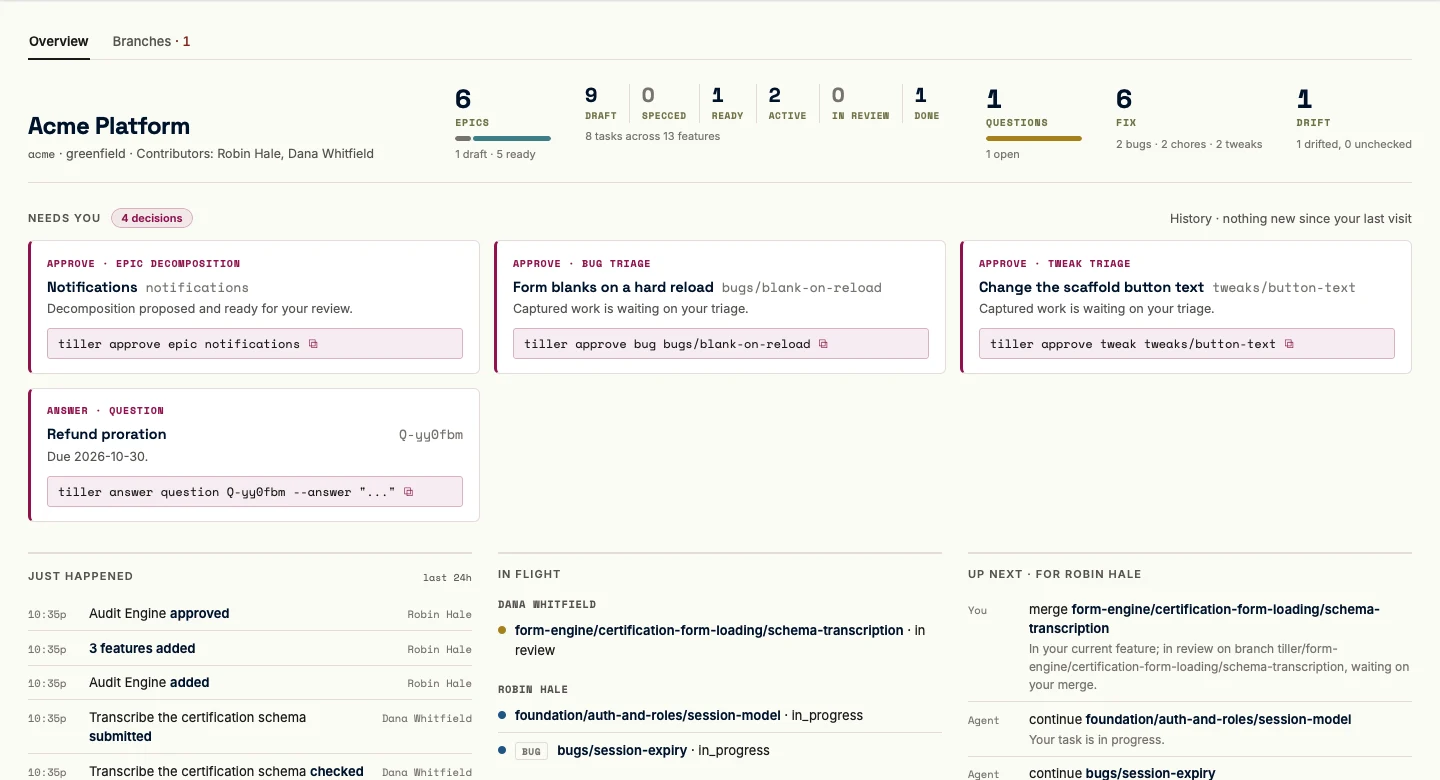
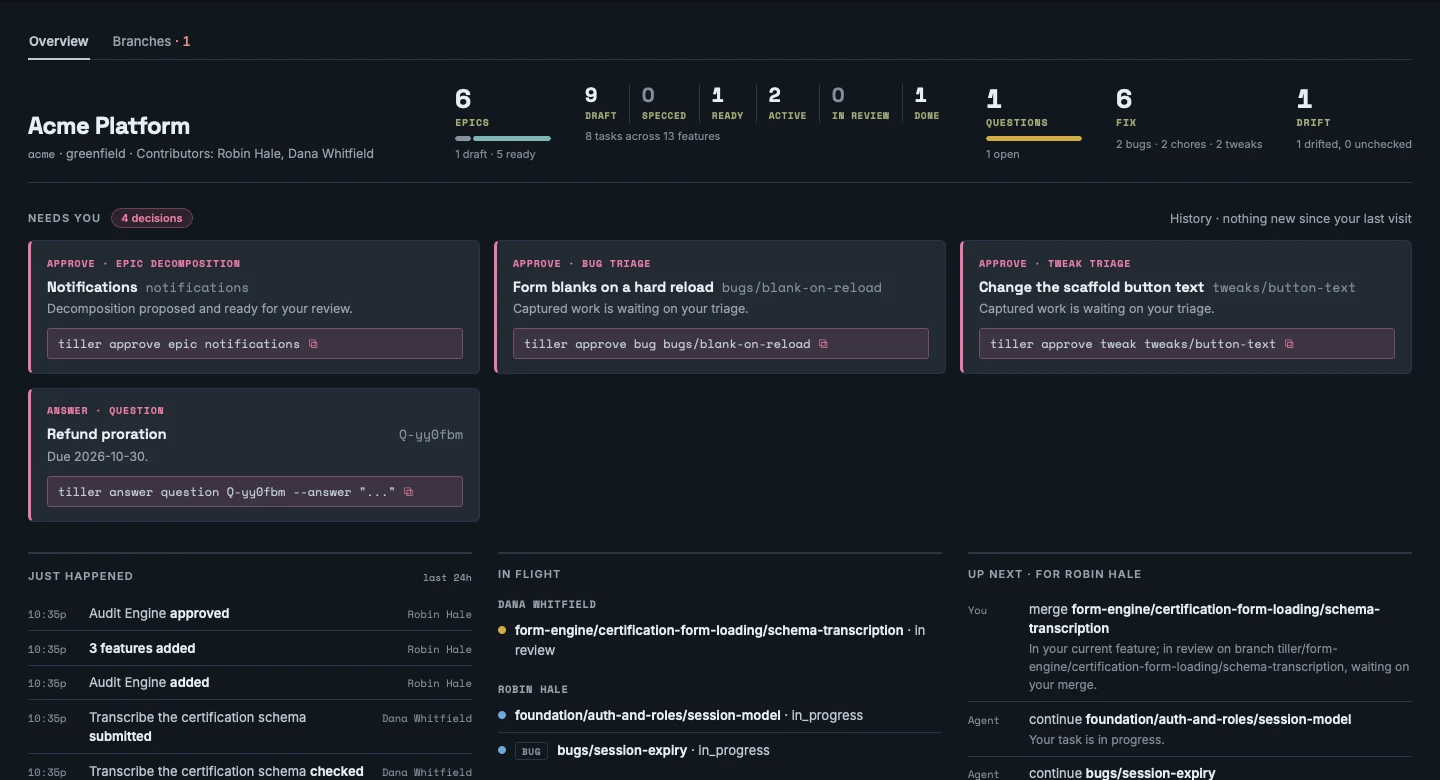
Section titled “See it”tiller serveopens the console on localhost. The decisions that need you, what’s in flight, what’s next, and the whole tree to browse, all read live from the working tree. The pending epic approval is the first card on Home, with its command ready to copy.
Choose where review happens
Section titled “Choose where review happens”The walkthrough above uses the default, task: each task owns its PR, and execute finishes after recording its review and publishing the submission-state commit. Review grain can move that review surface upward without changing the task loop:
tiller configure feature foundation/app-scaffold --review-grain feature# or, for every inheriting feature under an epic:tiller configure epic foundation --review-grain epicAt feature grain, the agent creates a separate working branch for every task and ordinary-merges each submitted task tip, including its submission-state commit, into tiller/reviews/features/<epic>/<feature>. Epic grain uses tiller/reviews/epics/<epic>. Once every riding task is in_review or done, the agent assembles all current tips, runs feature gates, prepares acceptance, and maintains one aggregate PR. Requested changes return to the affected task branch, then reassemble and recheck the same PR. Independent overrides finish their own PR first. No cherry-pick or squash assembly; only the final integration merge is human-only.
Choose the grain before work starts. Tiller refuses a change that would reinterpret submitted work or move an already-started feature into or out of an epic branch. If you don’t need a coarser review, the default task flow is the right place to start.
The first task, end to end
Section titled “The first task, end to end”From here the loop is short. The agent specifies the next feature and you approve its plan. The agent claims one task, whose first start permanently fixes its owner and activates the ready feature, works it on its own branch, runs gates, and submits the review. You merge. Tiller sees the merge and records done.
Approve the initial plan
Section titled “Approve the initial plan”tiller spec feature foundation/app-scaffold # the agent, after writing feature.md, feature.eval.md, and the initial taskstiller approve feature foundation/app-scaffold # you: the plan gatefeature foundation/app-scaffold (F-dv5ppv) is now specced.feature foundation/app-scaffold (F-dv5ppv) is now ready. 1 task(s) in the plan moved to ready with it.Extend the approved plan
Section titled “Extend the approved plan”Now the feature plan really is approved. One more task is additive work with its own task gate, not an amendment, and soft order can place it without creating another dependency:
tiller add task foundation/app-scaffold/document-local-setup --title "Document local setup"# write the new proposed task.md, then record the preferred sequencetiller order task foundation/app-scaffold/wire-the-build foundation/app-scaffold/document-local-setuptiller approve task foundation/app-scaffold/document-local-setupThe new task stays proposed until that final human approval. order is a preference for rendering and recommendations; it never gates the tasks. Direct link and unlink refuse real dependency changes once the affected work is locked, with dependency_change_locked; the one exception is a started task adding (never removing) an edge to a done task. Amendment is not an escape hatch: it has no link, unlink, or order operation, and revise only re-pins prose. In-place edge edits on unchanged started work are unsupported. Genuine replacement may use cancellation/supersession and fresh eligible work with its own prerequisites; never manufacture replacement merely to evade a lock. A fresh proposed task under an active feature can still receive its own legal sibling prerequisites.
To move a feature to another epic, a draft, task-free feature takes a direct rename --key. Otherwise stage tiller amend <amendment> --move-feature <feature> --to <epic>/<key> --reason "<why>", inspect and commit the proposal, then stop for human amendment approval. The skills page has the eligibility rules and what an epic ordering cycle means.
Work and merge
Section titled “Work and merge”The agent’s execute instruction includes ordinary commits, pushes, PR creation or reuse, and
submission unless you explicitly say not to publish. Green checks are intermediate. If a session
stops at check, re-enter execute without another start or resume; bare guide prioritizes
owned checked tasks before other ready or in-progress tasks, while preserving owner and question
guards. Tree work stays ahead of shelves; shelves prefer checked work, bugs before chores before tweaks within
each phase.
The initial Acme repository has no remote, so this example records a local review ref and you review and merge the branch locally. No host account or push is needed:
tiller claim task foundation/app-scaffold/wire-the-build # the agent, as you; this task only# Safely start from the configured integration branch; preserve unrelated work.tiller start task foundation/app-scaffold/wire-the-buildgit checkout -b tiller/foundation/app-scaffold/wire-the-build# implement the task and stage only its changed source filesgit commit -m "T-h389ih wire the build"tiller check task foundation/app-scaffold/wire-the-buildgit add .tiller && git commit -m "T-h389ih checks recorded"tiller submit task foundation/app-scaffold/wire-the-buildgit add .tiller && git commit -m "T-h389ih local review recorded"tiller readout execute# ... you review and merge the branch locally ...tiller syncClaimed foundation/app-scaffold/wire-the-build (T-h389ih) for robin.task foundation/app-scaffold/wire-the-build (T-h389ih) is now in_progress. Work happens on branch tiller/foundation/app-scaffold/wire-the-build. Create it from main; Tiller has not changed Git refs.Checked task foundation/app-scaffold/wire-the-build (T-h389ih): all required gates green; state is now check.task foundation/app-scaffold/wire-the-build (T-h389ih) is now in_review. Recorded branch tiller/foundation/app-scaffold/wire-the-build at 8755651. Offline review happens on the recorded branch.Sync: recorded 1 done crossing(s): - task foundation/app-scaffold/wire-the-build (T-h389ih) -> doneNotice what never happened. Nobody ran a command that marks something done, because there isn’t one. sync saw the merge on main and recorded the crossing. The feature and the epic will complete the same way, by rollup over their children, once their own required gates have run.
With a configured remote, use the project’s Git and host tools instead of the offline submission
above. After committing implementation and gate state, push the recorded branch. Reuse its open
PR or create the correct review with an explicit base and head, then pass its actual number to
tiller submit task ... --pr <actual-number>. Immediately commit and push the submission state
to that same branch, verify the remote contains it, and render the readout. Both pushes are the
agent’s work. Tiller itself does not push or open PRs. tiller guide execute provides the complete
host choreography and coarse-grain variations.
The readout’s Execution status includes all project tasks and uncarried shelf nodes in
in_progress, check, or in_review, not just your own. Gates green with evidence and
Current submissions recorded count that same population. The latter requires in_review
and the appropriate recorded PR or review ref; resumed work retaining an old PR does not count.
Checked work displays first, then in-progress, then in-review work. Next remains owner-scoped.
An empty execution population is not a successful handoff.
Recover an aggregate review missing after merge
Section titled “Recover an aggregate review missing after merge”If a feature or epic PR finally merged before its Tiller review was recorded, do not return to the merged branch or create another PR. An absent record means sync has not inspected the aggregate’s merge state, not that it knows a merge happened. Verify historical repository/PR/base/head/result identity with the project’s host tools and obtain explicit authorization to recover that named review.
On configured integration with relevant source inputs committed, record the actual historical binding:
tiller submit feature <feature> --pr <actual-number> --recover-merged \ --head <historical-reviewed-commit> --merge-commit <integration-result-commit> \ --reason "<why the record was missing>"Use epic for an epic-grain review; omit --pr only without a remote. Tiller validates local immutable Git evidence and labels the PR association caller-supplied. The record operation changes no status, gate, ownership, or acceptance. Commit its actual integration-state delta, run ordinary sync, inspect historical warnings and current acceptance separately, commit actual sync state, publish when authorized, and read back status/show/queue/readout. Exact retries write nothing. Deleted or advanced aggregate refs do not replace the historical anchors. Contained work without a merge witness still needs the human’s existing fast-forward assertion.
Share a feature without sharing ownership
Section titled “Share a feature without sharing ownership”Another registered developer may claim a different ready task under the same feature. Approval never assigns it to the approver or a sibling’s owner. Use release task or human-directed reassign task <ref> --to <contributor-id> --reason "<why>" only before start. First start fixes ownership permanently, even after resume, review, cancellation, or completion. Features/epics display Contributors from started tasks, not an exclusive owner. Claimed ready work is an assignment, not yet contribution.
Any registered developer may perform authorized aggregate assembly/checks/submission at feature or epic grain. Coordinate one updater at a time through Git. Shared checks, acceptance, and publication appear once per reviewed unit; the last task finisher surfaces that step without becoming its owner. At task grain, after every task is done, complete feature acceptance and ordinary sync on integration.
For an exceptional started-work handoff, the human must explicitly name work and recipient:
tiller transfer task foundation/app-scaffold/wire-the-build --to dana --reason "Dana will complete the remaining implementation"Use a real registered recipient and unfinished started work. The original is cancelled with its owner/history intact; the returned replacement is ready, unstarted, same-scope, and has a fresh ID/key/basis and no branch/review/green evidence. Start the returned ref as its recipient. Questions, pauses, dependencies, and carriers remain operative; started unfinished dependents or scope drift refuse before writes. Close an old task/shelf PR without merging and open a replacement; at coarse grain update the existing unmerged aggregate PR and rerun affected checks/acceptance. Git/host follow-through is separate from Tiller’s state transaction. Already-merged work requires sync and forward work instead.
Capture a bug
Section titled “Capture a bug”Foundation’s app scaffold is live now, and someone notices the form goes blank on a hard reload. That isn’t a plan change. It’s a defect against work already merged, so it goes on the bug shelf instead of back into the tree. The agent runs tiller guide capture, which loads the capture skill, then writes one complete proposed contract and stops before triage:
tiller add bug blank-on-reload --title "Form blanks on reload" --attach foundation/app-scaffold# write the complete Reproduction, Expected, Actual, and Fixed when contract into bug.mdgit add .tiller && git commit -m "capture: blank-on-reload"Created bug bugs/blank-on-reload (B-4k2p9x) in proposed: "Form blanks on reload" (attached to foundation/app-scaffold (F-dv5ppv))Capture never approves, claims, or starts what it just wrote. Triage is yours:
tiller approve bug blank-on-reloadbug bugs/blank-on-reload (B-4k2p9x) is now ready.With a remote configured, the agent works the bug on its own branch and PR. Here origin and
main represent the project’s configured remote and integration branch:
tiller claim bug blank-on-reload # the agent, as youtiller start bug blank-on-reloadgit checkout -b tiller/bugs/blank-on-reload# fix the bug and stage only its implementation and regression-test pathsgit commit -m "B-4k2p9x fix blank reload"tiller check bug blank-on-reloadgit add .tiller && git commit -m "B-4k2p9x checks recorded"git push -u origin tiller/bugs/blank-on-reloadgh pr list --state open --base main --head tiller/bugs/blank-on-reload# reuse an open matching PR; only when none exists:gh pr create --base main --head tiller/bugs/blank-on-reload \ --title "bugs/blank-on-reload (B-4k2p9x)" --body "Attached to foundation/app-scaffold (F-dv5ppv). Fix blank reload."# use the actual PR number returned by the hosttiller submit bug blank-on-reload --pr <actual-number>git add .tiller && git commit -m "B-4k2p9x in review"git push origin tiller/bugs/blank-on-reloadtiller status bug blank-on-reloadgit ls-remote origin refs/heads/tiller/bugs/blank-on-reload# verify the remote includes the submitted state committiller readout execute# ... you review and merge the PR ...tiller syncClaimed bugs/blank-on-reload (B-4k2p9x) for robin.bug bugs/blank-on-reload (B-4k2p9x) is now in_progress. Work happens on branch tiller/bugs/blank-on-reload.Checked bug bugs/blank-on-reload (B-4k2p9x): all required gates green; state is now check.bug bugs/blank-on-reload (B-4k2p9x) is now in_review.Sync: recorded 1 done crossing(s): - bug bugs/blank-on-reload (B-4k2p9x) -> doneIt’s the same loop you just ran for a task (claim, start, check, submit, final integration merge, sync), addressed as bug bugs/blank-on-reload instead of task foundation/app-scaffold/wire-the-build. Both own a working branch; the shelf always owns its PR, while a task can ride a coarse aggregate review.
If PR creation succeeds but submission refuses, report the open PR and still-unsubmitted state
separately. If submission succeeds but its state push fails, keep in_review and identify the
unpublished commit. Never force-push or change remotes to bypass a refusal. Requested changes
resume the same reviewed work, rerun checks, reuse the PR, and publish the new submission state.
Ordinary publication needs no second go-ahead; genuine missing credentials, tools, or safe conflict
resolution can require your help. Approval, attestation, and merge remain your decisions.
The developer owns and is responsible for every change. The skills instruct agents not to identify themselves, their model, provider, or harness as an author or contributor anywhere in the work. That includes code, comments, docs, commits, PRs, and reports: no generated-by notices, agent signatures, or agent co-author trailers. The rule preserves real human credits and required third-party notices. It is guidance for the agent, not a CLI content filter.
Keep a checkout current
Section titled “Keep a checkout current”tiller upgrade # update the binary and this checkout's schema/instructionstiller upgrade --project-only # offline maintenance after a separate install or in another checkouttiller upgrade --binary-only # intentionally update only the binaryNormal upgrade also refreshes when the binary is already current. Project-only uses the running
binary without network or Homebrew and cannot select --version; it is mutually exclusive with
binary-only. Outside a project, normal upgrade updates only the binary and reports that scope.
Inside one, it selects the current resolved checkout, even from a subdirectory. It never discovers
or rewrites other repositories, branches, or worktrees.
Artifact refresh does not need identity and never changes it. A schema migration needs a
registered actor through --contributor, TILLER_CONTRIBUTOR, or local identity. Missing checkout
identity still calls for onboarding with tiller join --as <id>, not an invented contributor.
Before replacing the binary, upgrade keeps the outgoing build under
~/.local/share/tiller/previous/<version>-<sha256>/tiller and reports its path. Homebrew remains
the owner of cask installs; upgrade delegates only the Tiller package to brew and never falls back
to overwriting brew’s files directly.
Binary replacement, migration, and generated refresh are separate durable steps. A failed later
step is nonzero and preserves completed steps; repair the named cause before a project-only retry.
Review and commit the reported diff, restart existing tiller serve processes, and reload harness
instructions as needed. Shims load full instructions through tiller guide; do not hand-edit them
or generated orientation. The distribution spec covers the
full upgrade contract.
Where to next
Section titled “Where to next”- Concepts for the mental model behind all of this: the tree, the lifecycle and its gates, who does what, drift and amendments, and bugs, chores, and tweaks.
- Skills for what the agent is actually reading.
- The CLI reference for every command, and
tiller status <noun> <node>any time you want to know what’s legal from here. - The console’s Explore tab, then Map, for a mind map of the whole project, epics down to bugs, chores, and tweaks, with the dependency graph drawn as arcs.
- The console’s Fix lens for the shelf-work board, six columns from Proposed to Closed.